How do I compare locations or markets in Market Intelligence?
There are three ways to compare locations or markets in the Market Intelligence section of Stratas: the Market Map page, the Market Overview page, and the Reported Wages & Employment page.How do I compare driver markets across high-level metrics?
The best way to compare driver markets across high-level metrics is to use the Market Map page in the "Investigate Markets" section of Market Intelligence. This page allows you to select a metric to view across different locations and to pick a location type (state, metropolitan area, or county). You can further filter to specific locations by expanding additional filters. Furthermore, you can view the results in a sortable, searchable, and downloadable table for easy comparison across multiple locations.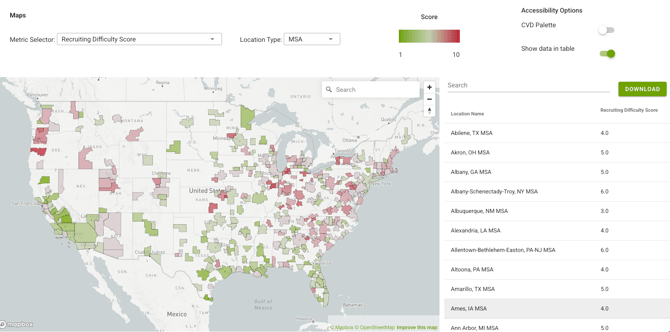
You can also compare driver markets on the Market Overview page in the "Investigate Markets" section. Click the  icon by any metric, and a table will open showing all markets' numbers in that metric, highlighting your currently selected market.
How do I compare markets for technician jobs?
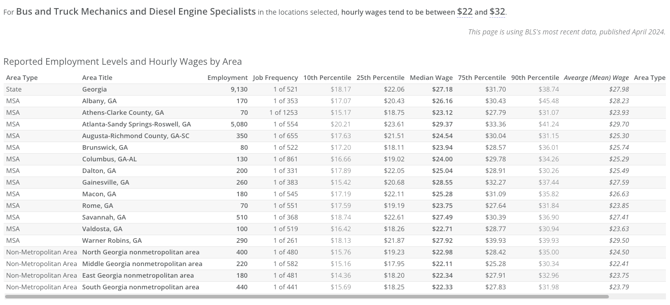
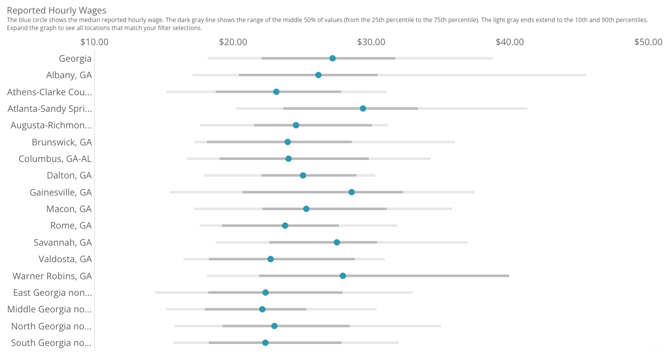
To compare markets for technician jobs, use the Reported Wages & Employment page in the "Investigate Markets" section. Select the technician type relevant to your search, and a table will show reported wages and employment levels by state, metropolitan statistical area, and non-metropolitan areas. Filter down to specific regions, states, location types, or even specific markets to compare relevant locations.